Tickets and workstreams
Put the checkout tickets in To Do, and make the payment bug urgent.
list_itemschange_status ×4update_item
Moved 4 tickets to To Do. TOM-31 is Urgent now.
TOMRADE
喵喵,喵喵 MEOW MEOW
For indie developers and small teams who build with AI agents and run their days with them
Tickets, terminals, sessions, notes: Tomrade weaves together everything you need and reports in on its own. You? Smooth sailing.
Preview Version 0.28.0, released November 6, 2026
Download for macOS (Apple silicon)On Windows? The installer isn't signed yet. Read this before installing
Tomrade is a desktop app for macOS, Windows and Linux. Download it on your computer.
DownloadA message on Discord becomes a ticket on the board.
Name a ticket; your agent claims it, branches and reports back.
Answer every agent from one sidebar.
Linked notes, and an architecture diagram drawn from your code.
Issues come in, get triaged, and ship.
Point it at a repo; it finds the branches you forgot.
A pet, a timer, models, themes, and the plugin it writes for you.
Why Tomrade
A row of agents running, and you have to check on each one.
Agents claim their tickets, branch, and report back on their own. When a pull request goes up the ticket moves along; they only come to you when they need your call.
Every session starts from zero.
Ideas, tickets, decisions and what's already done stay in one place across sessions and agents, so the next run starts where the last one stopped.
Another tool, another window to babysit.
Claude Code, Codex or Cursor stay in the terminal you already use. Tomrade connects over MCP and git, and the board keeps up on its own.
Something changed. Who did it?
Every agent write is attributed and grouped by run. One click takes a whole run back: tickets, notes and settings alike.
Notes in one app, chores in another, feedback in a third.
Files and notes, everyday to-dos and the inbox of feedback live in the same workspace as your tickets, and your agents can read them too. Less switching, a smoother day.
How it works
One loop from an idea to a merged pull request.
Say what you want in plain words, at your desk or from your phone. It becomes a ticket on the board, ready to start.
Say “tidy up” and the assistant merges duplicates and splits the big ones into tickets sized for one pull request. You pick; one click takes it back.
Press Start on a ticket, or name it to Claude Code, Codex or another agent in your own terminal. It claims it, works on its own branch and reports back.
Once the pull request's checks pass, take a look and press Merge: the ticket is done. Or let the agent merge it itself when the checks pass, and the loop closes without you.
The assistant
It isn't only a backlog planner. The assistant works on everything Tomrade holds: tickets and workstreams, files and notes, diagrams, even Tomrade's own settings. And when there's nothing to do, it's happy to just talk.
Put the checkout tickets in To Do, and make the payment bug urgent.
list_itemschange_status ×4update_item
Moved 4 tickets to To Do. TOM-31 is Urgent now.
Turn this week's journal into a weekly review.
search_filesread_file ×5write_file
Read five entries and saved Weekly review.md, with a link back to each day.
Switch to dark mode, and put the cat on my desktop.
update_settings
Done: dark theme, and the cat's on your desktop now.
Should I name my corgi Biscuit or Mochi?
No tools. No changes. Just vibes.
Shout both across a park. Whichever you're less embarrassed to yell, that's the one.
Every change it makes is attributed and lands in History, where ⌘Z takes it back: tickets, files and settings alike. API keys, MCP servers and command lines stay yours to change.
All roads lead to Tomrade
Comrade, not foreman.
Other tools want the work done inside them, or only ever hand it out. Tomrade goes both ways. Set it up once, keep working in the AI agents you've already tuned, in your own terminal, and the status finds its way back to the board.
Terminal
Alt-Tab cardio: cancelled.
Run Claude Code, Codex or a plain shell in Tomrade's own Terminal window, one click from the backlog. Split it however you like, let each pane connect to its ticket, and see at a glance which agent is working and which one is waiting on you. Quit Tomrade and your agents keep soldiering on.
Built on herdr, the open-source agent multiplexer; on Windows, Tomrade's own terminal, nothing to install.
Sessions
Six agents, one place to ask you things.
A single agent conversation can carry a whole afternoon: three tickets, a question, a fix. Tomrade marks where each ticket begins, shows the same session in the assistant panel and in its Terminal window cell, and keeps the ones waiting on you at the top.
Undo, not approve
Approval queues? In this economy?
Agents write straight to the backlog, so nothing waits on you. Every run is grouped and attributed, and when one gets creative, a single click puts all of it back.
History lists every change, newest first, and who made it. Roll back to any point.
Context that follows the work
Notes, files, conversations and incoming feedback sit next to the tickets they belong to, where you and your agents can both reach them.
Files & notes
Each project carries a folder of files: Markdown, HTML, images, anything. Write in an editor that previews as you type, link notes to each other, and attach them to tickets as deliverables.
Inbox
The backlog has a bouncer now.
Issues and reports land in the project's inbox first. The assistant proposes what each one is (a new ticket, a bug you already have, or a duplicate) and drafts the reply. One click confirms it.
GitHub issues come built in. Sources are plugins too: bring in your support mail or a feedback form.
One workspace
Every project is a board plus a folder of files. Connect it to a repository, or fill it with nothing but your week.
Talk a feature into tickets sized for one pull request, then let Claude Code or Codex build each one on its own branch.
TOM-42Autosave draftsVerifyingTOM-43Offer a restore on reopenDoingErrands, chores and plans on a board or a table. Brain-dump to the assistant and it sorts the mess into tasks.
Today's note opens a dated page in your Journal folder. Tag the days and link them with [[wiki links]].
Journal/2026-10-10.md
2026-10-10
Long walk by the river. Finally fixed the #bike.
Markdown with a live preview, backlinks and full-text search. Every save is versioned and can sync to a GitHub repo.
A daily to-do, the week's chores, a regular review: save them as routines, run one whenever you like, or give it a schedule and let it make the tickets or ask the assistant on its own.
Ways to play
The extras that make a long day with agents a little lighter. Most of them are plugins you can switch off.
Toilet-break productivity unlocked.
Connect a bot in Discord, Slack, Telegram, Feishu / Lark, DingTalk or WeCom, and the assistant answers in DMs and @mentions with the same project and tools.
ANSWER ME!
The pet mirrors what your agent is doing: thinking, working, waiting on you, done. Or bring your own pet, one picture per mood.
Your dark mode says a lot about you.
Sunrise is the default and Daybreak its night; Dawn, Matcha and more come built in too. Make your own, from any picture if you like, and let it switch with the time of day.
Your pelvic floor is calling.
25 minutes of focus, 5 off, and a desktop clock that floats over every window. What you do with the break is up to you.
Built-in plugins
Archify comes built in. Ask the assistant, Claude Code or Codex for an architecture, workflow, sequence, data-flow or lifecycle diagram, and it lands in the conversation as a live page you can pan, zoom, trace and present. Save it to Files with its source, and ask for changes later.
YouDraw how a ticket gets from one sentence to a merged PR.
Open it live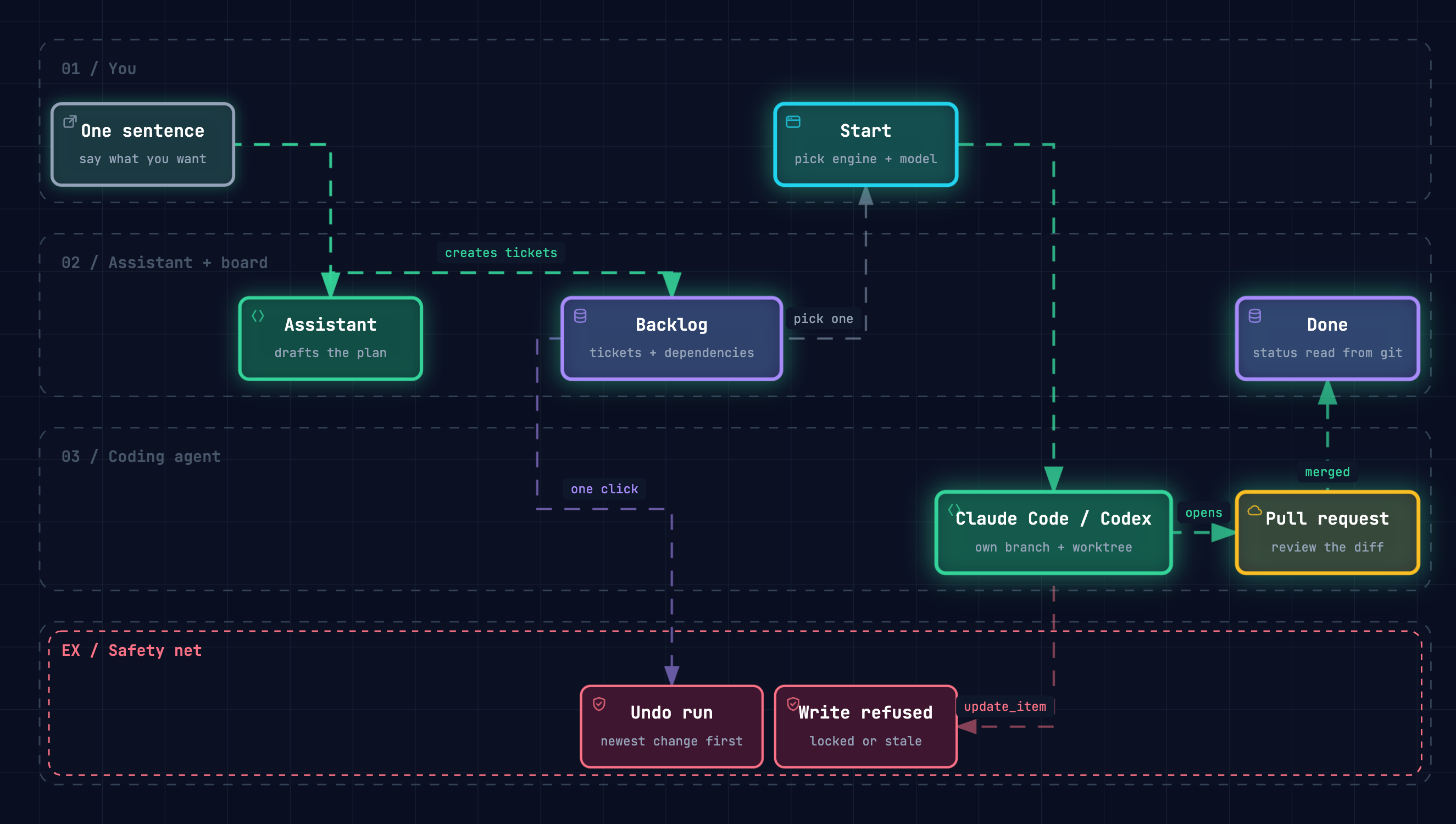
YouWhere does Tomrade keep my work, and what leaves my machine?
Open it live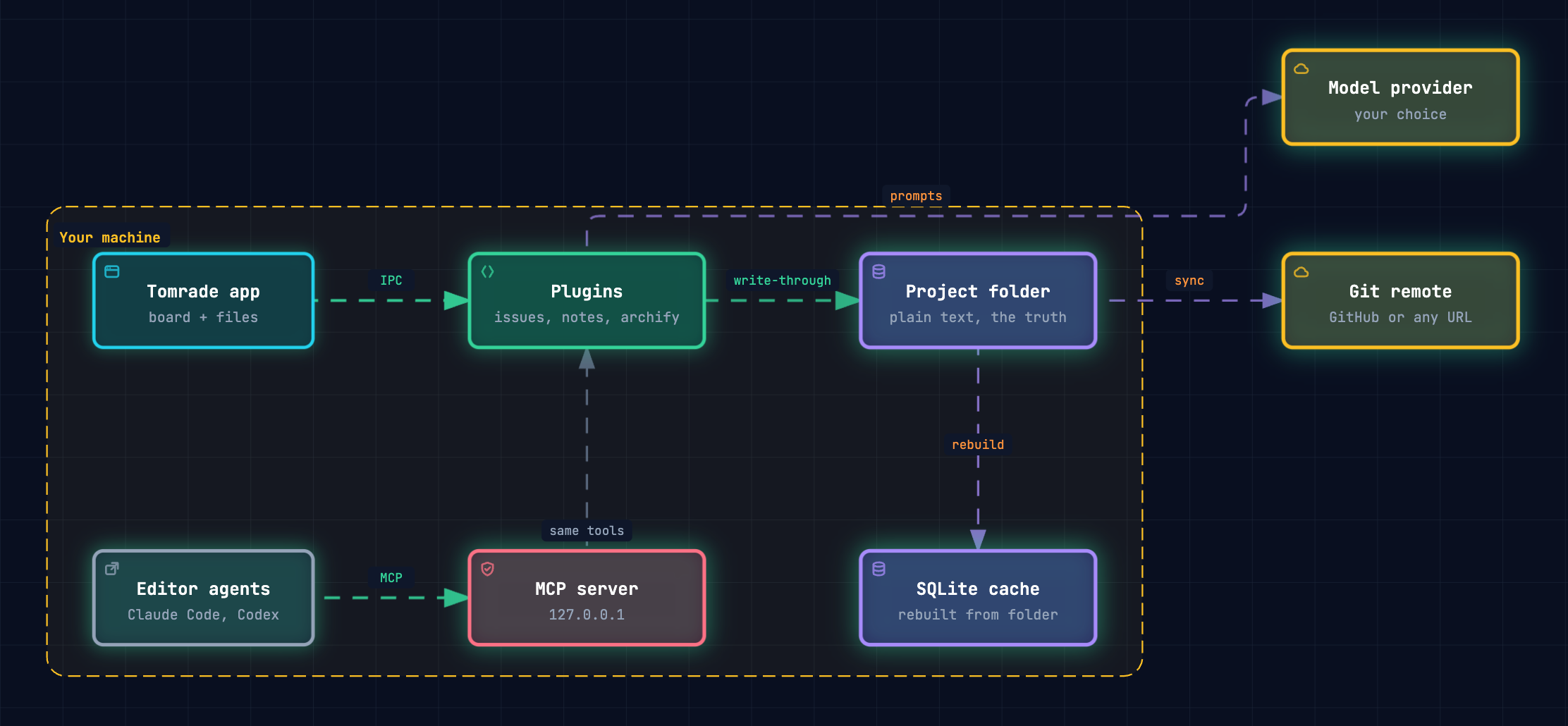
YouWhat happens when Claude Code edits a ticket I locked?
Open it live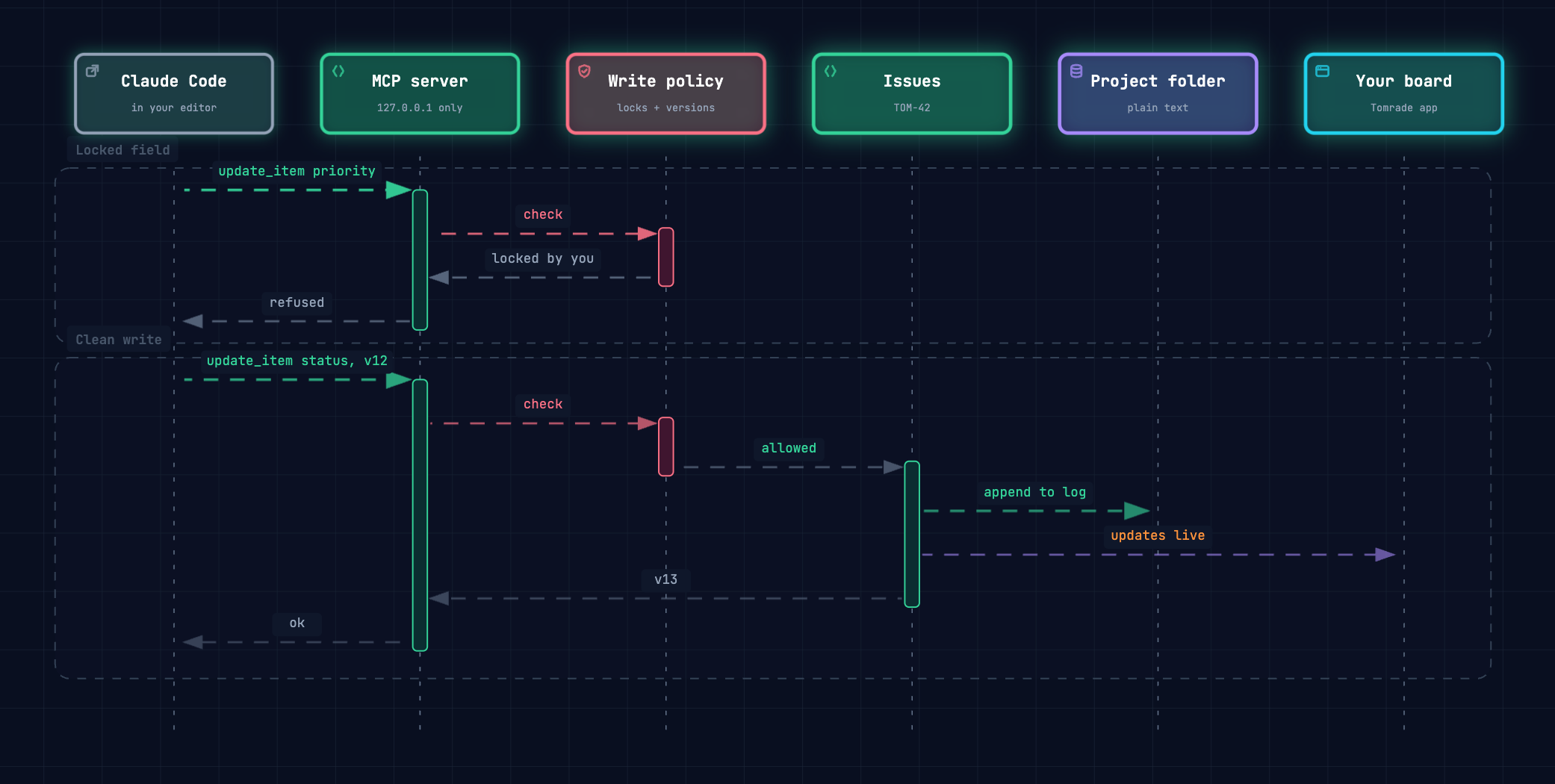
YouShow how a ticket's status follows git.
Open it live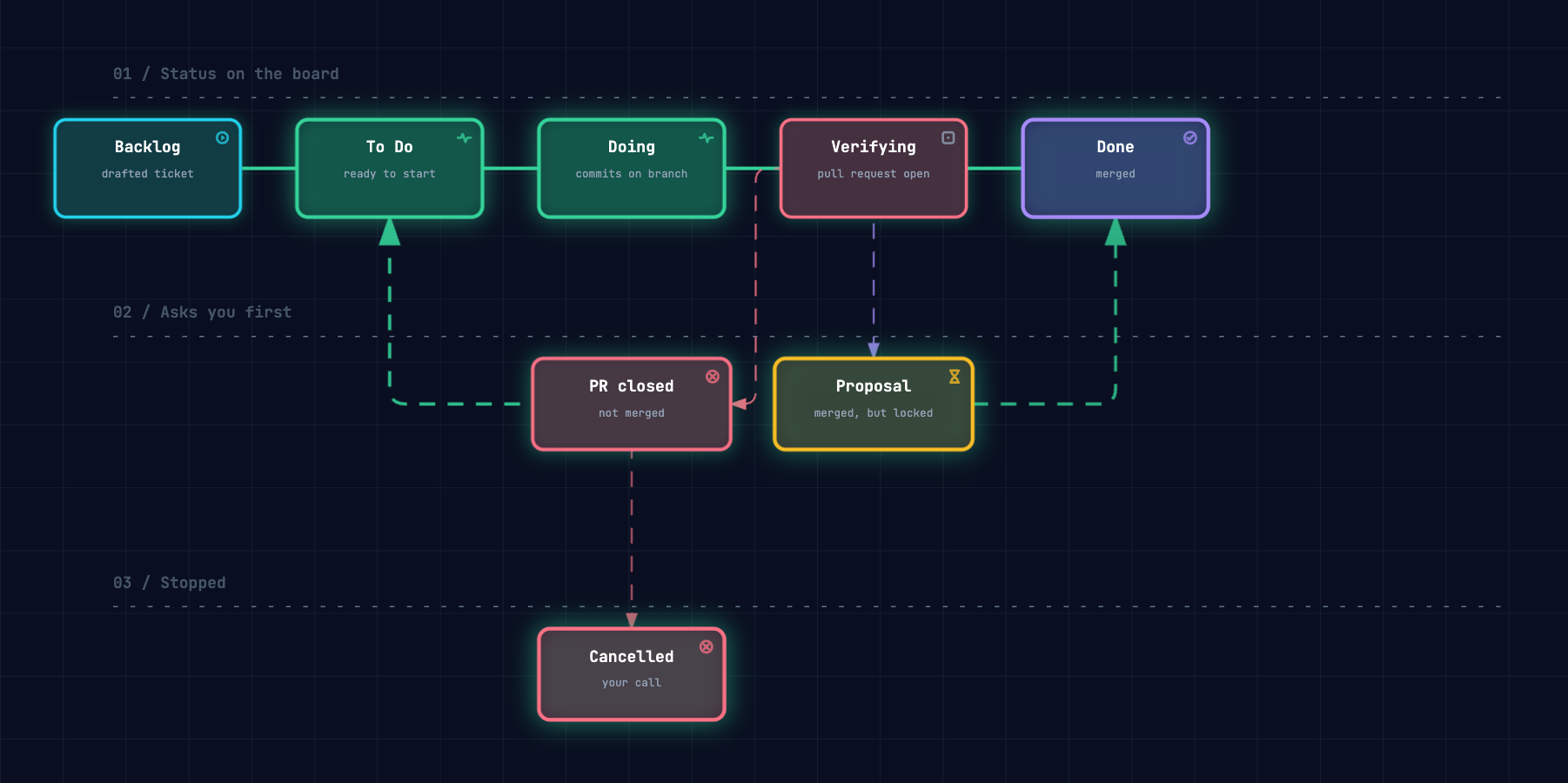
Rendered by the Archify that ships with Tomrade. Each one is about Tomrade itself.
Archify is an open-source project (Apache-2.0) by tt-a1i. Tomrade fetches a pinned copy from GitHub the first time you ask for a diagram.
Each one is a plugin. Switch any of them off in Settings › Manage plugins.
See what blocks what: the backlog drawn as a graph, and a badge on every ticket still waiting on unfinished work.
Each ticket knows its branches, worktrees and pull requests. Its status follows git, and Start hands it to a coding agent.
Connect any MCP server over stdio or HTTP. Its tools join the built-in ones, for the assistant and every agent.
Every save is a version. Share a project's files through a GitHub repository, found or created for you.
A menu of workflows that runs with no model at all: offline, keyless, repeatable. Off until you switch it on.
Describe the plugin you want. An agent writes and tests it, and it loads only after you confirm the build.
Scan a repository's unmerged branches, idle worktrees and open GitHub issues into a draft backlog. Only what you tick becomes a ticket.
Publish the roadmap and changelog you tick, with a feedback link, as one page on your repository's GitHub Pages.
In Usage: merged pull requests by the agent that wrote them, how many passed the first time and what each cost, as a share image.
Plugins
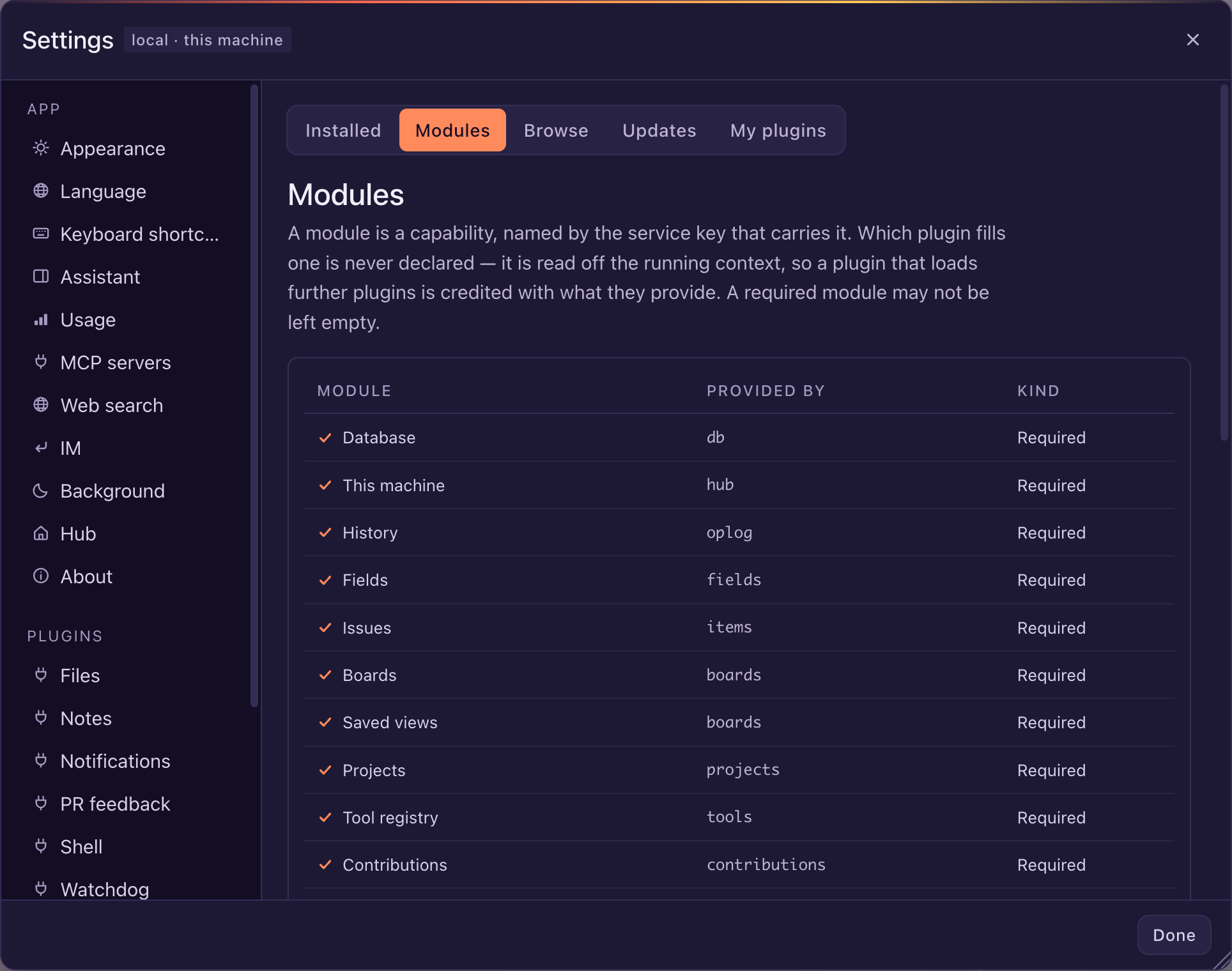
The database, the tool registry, the MCP server and the assistant are each a plugin you can swap out. Write your own against the Apache-2.0 SDK and ship it under any license, or ask the agent to write one for you in Plugin Studio. Find more, official and community, in the plugin store.
License
Tomrade is open source under the Apache License 2.0: the app, every package and the plugin SDK alike. The code is on GitHub. It is still in development and testing, so expect it to change from week to week.
FAQ
No. The board, the assistant and Files work for any project: a household, a trip, a thesis, a journal. Coding agents join in when a project has a repository and stay out of the way when it doesn't.
They do different jobs, and they work together. Tools like those run your agents and help you review their code; Tomrade keeps what the agents should work on, how far each piece got and what changed. Keep running agents where you like: they connect to Tomrade over MCP and git, claim tickets, and the board follows their branches and pull requests.
Every write Tomrade makes or lets an agent make: tickets, files and notes in Files, and settings. Revert an assistant run in one click, or roll History back to any point. A permanent delete is the one thing you can't take back. It doesn't reach outside Tomrade: commits, branches and pull requests in your repository stay with git, where you revert them the usual way.
No. A local git repository is enough: name a ticket in a branch or a commit and the ticket follows it. Opening and merging pull requests from Tomrade uses GitHub today, and Files can sync to a GitHub repository if you want; neither is required.
It's a preview. Until 1.0, Tomrade is in development and testing: features change between versions, and you will hit rough edges. Your projects are plain folders on your own machine, so back up the ones that matter.
Yes. Tomrade is licensed under the Apache License 2.0, an OSI-approved open-source license, for the app, every package and the plugin SDK alike. You can use, change and redistribute it, commercially too. The source is on GitHub.
Your projects live on your machine, one plain folder each. If you sign in, your account keeps only your preferences and the list of your projects. Project content leaves your machine only if you connect a model provider or a git remote.
No. Choose “Use without an account” and everything stays on this machine. Signing in only keeps your preferences and the list of your projects in sync across computers. An account never holds project content: issues, files and code stay in your project folders.
The built-in assistant works with DeepSeek, Anthropic, OpenAI, Gemini, Kimi, OpenRouter, any OpenAI-compatible endpoint and local models, and more through plugins. Claude Code and Codex can also drive Tomrade directly, using your own CLI login.
Yes, in Settings. You can also swap it for a pet of your own, or unload the pet plugin entirely. The cat will not take it personally. Probably.
It's on the way. Can't wait? Message the assistant from Discord, Slack, Telegram, Feishu / Lark, DingTalk or WeCom today. It answers as long as Tomrade runs on your computer, which it can keep doing in the background with every window closed. Pulling an all-nighter is the computer's job, not yours.
Officially, it only reminds you to take a break. Unofficially, the alert can be any audio file you like. You know what to do.
macOS (Apple silicon and Intel), Windows (64-bit) and Linux (x64 and Arm64 AppImage).
English, Simplified and Traditional Chinese, Japanese, Spanish, German, French and Russian.
Free to use and open source under Apache 2.0. Your projects stay in your own folders.
Preview Version 0.28.0, released November 6, 2026
Download for macOS (Apple silicon)On Windows? The installer isn't signed yet. Read this before installing
Tomrade is a desktop app for macOS, Windows and Linux. Download it on your computer.
Download